
Implemented

Remove the need to click the upload button twice when uploading a file to webIU

Related products:WebUI
  • December 3, 2021
  • 3 replies
  • 47 views

Forum|alt.badge.img

Hello!

Currently, in order to upload a file to WebUI, the user first needs to click the upload button, which then opens up the file selector. Once the file is selected, the user needs to click that same button once again. Otherwise, the upoad process will not be completed.

We feel that this is a counterintuitive feature, and many of our end-users have made remarks on this topic, asking if it would be possible to remove the third step. In that way, once the users select the file and click the "open" button, the file would automatically upload, removing the need to click the upload button a second time. 


Step 1: Click the upload button


Step 2: select a file and click “open”
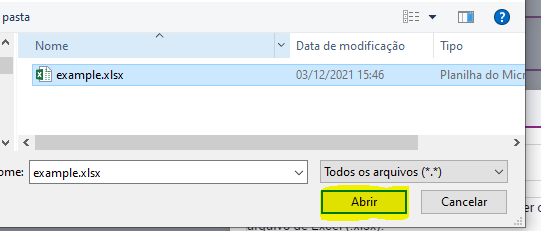

Step 3 (the one we would like to remove): click the upload button once again

 

Would that be possible?


Thank you!

3 replies

Madhu Krishnappa
AIMMSian
Forum|alt.badge.img+5
Updated idea statusNewOn Backlog

Madhu Krishnappa
AIMMSian
Forum|alt.badge.img+5
On BacklogImplemented

Madhu Krishnappa
AIMMSian
Forum|alt.badge.img+5

Hi@barbaraconde,   

I'd like to draw your attention to the Two New WebUI Library Functions webui::RequestFileUpload and webui::RequestFileDownload. These functions have been introduced in the AIMMS 24.3 version, to enable you to trigger file uploads and downloads from within an AIMMS procedure, allowing you to incorporate them behind buttons, item-actions, or widget actions. For more detailed information, please refer to the documentation.

It's worth noting that there have been no modifications or enhancements made to the current Upload widget version. However, you can utilize the new library functions to benefit from single-click upload actions behind a button or other similar actions.


Thanks,

Madhu Krishnappa


Didn't find what you were looking for? Try searching on our documentation pages:

AIMMS Developer & PRO | AIMMS How-To | AIMMS SC Navigator

