

Solved

Getting started - unable to create variables

  • Jan 8, 2021 2:41 PM UTC
  • 2 replies
  • 111 views

Forum|alt.badge.img+1

A very basic question from a new user:

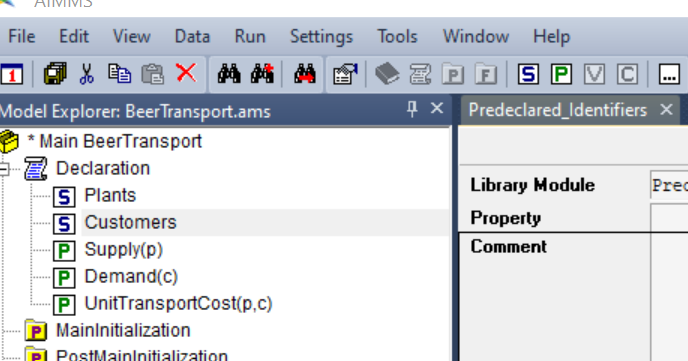
I am trying to get started in the foundational training. When I create a new project to follow the basic tutorials, I am unable to create a new variable (though I can create sets and parameters). There is no error message that appears, but the buttons are grayed out (see screenshot below). I have tried in several AIMMS versions. Can anyone tell me what's going wrong here?
Best answer by Anonymous

My suspicion is that this is a license issue/limitation. Can you send your license number to support@aimms.com so we can check. Please refer to this post.


View original

2 replies

  • Answer
  • Jan 8, 2021 11:27 PM UTC

My suspicion is that this is a license issue/limitation. Can you send your license number to support@aimms.com so we can check. Please refer to this post.


Forum|alt.badge.img+1
  • Author
  • Enthusiast
  • Jan 11, 2021 9:40 AM UTC

Thanks, Gertjan! I will do that. 


Didn't find what you were looking for? Try searching on our documentation pages:

AIMMS Developer & PRO | AIMMS How-To | AIMMS SC Navigator