



Hi everyone,
A request we've heard for a long time is a way to make a Button widget inactive: visible on the page, greyed out, and not clickable. Today a button is either clickable or hidden. When an action isn't available, the only options are to hide the button, so the user doesn't know the action exists, or to leave it clickable and handle the click in the model.
We're designing an Inactive state for the Button widget and would like your feedback before we build it. Below is what we have in mind, with a few questions at the end. Answers to any of them help, even one or two.
Where an inactive button helps
- Preventing duplicate clicks while something runs. When a button starts a solve, a job, or a request to another service that returns immediately, users may click again because nothing seems to happen, and start the same work twice. With an inactive state, the button can be greyed out while the work runs.
- Actions that aren't available yet. For example, a "Publish" button that only makes sense after a successful solve. The user sees the action exists, but can't use it until the app is ready.
- Buttons that are hidden today. Many apps hide buttons that can't be used right now. That keeps users from clicking them, but it also hides what the app can do. An inactive button keeps the action visible, in context.
What it looks like
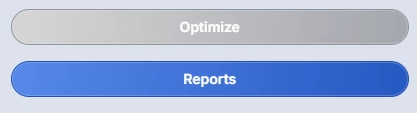
An inactive button is greyed out, and clicking it does nothing. The tooltip still shows on hover, so you can use it to explain why the action isn't available.
How you set it up
The Button widget gets a new option, State, with two values:
- Active (the default): the button is clickable, exactly as today.
- Inactive: the button is greyed out and can't be clicked.
You can set State to a fixed value, or to a scalar string parameter holding "Active" or "Inactive". Matching is case-insensitive, so "inactive" works too. With a string parameter, the model switches the button at runtime. For example:
! At the start of the procedure behind the button
spOptimizeState := "Inactive";

! ... start the solve ...

! When the solve is done
spOptimizeState := "Active";
Because the default is Active, existing apps won't change until you use the option.
Invalid values. If the parameter is empty or holds an unknown value, such as a typo, the button stays Active, and the app developer sees an error message. The value is checked when the widget appears on the page and every time it changes. End Users never see this message.
Styling. A new theming variable lets you set the color of inactive buttons, in line with the Button widget's existing theming support.
Out of scope
- Automatic inactive state while a procedure runs. WebUI won't grey out a button by itself. The app developer sets the state in the model.
- Duplicate solves are not solved directly. App developers can use the inactive state to prevent them, as in the example above.
- Changes to hiding buttons. Hiding a button is still done with the existing Visible option, independently of State.
Your feedback
We'd like to hear how this fits your WebUI apps. Please share your thoughts on any of these questions:
- Do you have buttons today that you hide, or leave clickable, because there's no inactive state? What do those buttons do?
- Do you have use cases for an inactive button beyond the three above?
- Does "greyed out, not clickable, tooltip still shown" match what you'd expect from an inactive button?
- Is setting the state from the model with a string parameter workable in your apps?
- Suppose your string parameter is empty, or contains a typo like
"Inactve". We plan to treat that as Active: the button stays clickable for End Users, and you as the app developer get an error message, both when the page opens and whenever the value changes. Does that work for you? Or would you rather the button became Inactive in that case, so a mistake never leaves an action available that shouldn't be? - Does a theming variable for the inactive color cover your styling needs?
- Any other cases where an inactive button should behave differently?
Thanks,
Madhu Krishnappa
AIMMS WebUI Product Owner