



Seeking Community Input on the Gantt Chart Widget Overhaul

  • July 30, 2025
  • 4 replies
  • 143 views

Madhu Krishnappa
AIMMSian
Forum|alt.badge.img+5

Dear AIMMS Community,

As part of our ongoing commitment to enhancing the AIMMS WebUI, we are preparing a comprehensive overhaul of the Gantt Chart widget. This redesign aims to enhance its capabilities, performance, and usability to better support a wide range of planning and scheduling scenarios.

We would greatly appreciate your input and suggestions to help guide this effort.

We are particularly interested in hearing your thoughts on:

  • Desired features or capabilities

  • Usability improvements

  • Performance expectations (especially with large datasets)

  • Styling and customization options

  • Support for specific use cases in your apps

  • Or even something entirely new...

Please note that several ideas already submitted in the Ideation section have been reviewed and taken into consideration during the initial scoping of this redesign. We appreciate the contributions made thus far. We now invite further input to ensure a more comprehensive understanding of user needs and use cases.

📩 Please leave your feedback in the comments below. Your input will help shape the scope and priorities of the redesign.

Thank you for your continued engagement and support.

Sincerely,
Madhu Krishnappa
AIMMS WebUI Product Owner
4 replies

Thanks for asking for feedback! The following bugs fixed or features if added out of the box, it would really help!

  • Ability to scroll/zoom within the time range without adding additional workaround code to adjust the viewport ranges. (i.e. instead of adding another Gantt chart time bar that controls the primary Gantt chart’s viewport)
  • Gantt chart label text gets cutoff if it can’t fit within the bounding box of the Gantt chart element. For e.g, if the label is 57 then parts of 5 and 7 get cutoff as the Gantt chart element becomes smaller in width as the  time window expands
  • The text spacing in the labels also looks compressed even if there is enough space but this is not as big of an issue like text getting cutoff
  • The removal of support for HTML line breaks <br> prevents us from having multi-line tooltips
  • Expanded css options if recognized by the Gantt Chart widget will be helpful
  • Easy option to modify/set the same colors to Gantt chart blocks in a single row without needing annotations and css
  • Darker x-axis date labels to improve contrast

Madhu Krishnappa
AIMMSian
Forum|alt.badge.img+5

Hi All,

I’m excited to share that the first version of our fully revamped Gantt Chart widget (GanttChart v2) is now available in AIMMS WebUI 25.8.

You can read more details about this here.


Thanks,
Madhu Krishnappa
AIMMS WebUI Product Owner


  • Enthusiast
  • December 18, 2025

Dear AIMMS Community,

As part of our ongoing commitment to enhancing the AIMMS WebUI, we are preparing a comprehensive overhaul of the Gantt Chart widget. This redesign aims to enhance its capabilities, performance, and usability to better support a wide range of planning and scheduling scenarios.

We would greatly appreciate your input and suggestions to help guide this effort.

We are particularly interested in hearing your thoughts on:

  • Desired features or capabilities

  • Usability improvements

  • Performance expectations (especially with large datasets)

  • Styling and customization options

  • Support for specific use cases in your apps

  • Or even something entirely new...

Please note that several ideas already submitted in the Ideation section have been reviewed and taken into consideration during the initial scoping of this redesign. We appreciate the contributions made thus far. We now invite further input to ensure a more comprehensive understanding of user needs and use cases.

📩 Please leave your feedback in the comments below. Your input will help shape the scope and priorities of the redesign.

Thank you for your continued engagement and support.

Sincerely,
Madhu Krishnappa
AIMMS WebUI Product Owner

Great initiative. Stronger performance with large datasets and more flexible styling would be my top priorities.


Madhu Krishnappa
AIMMSian
Forum|alt.badge.img+5

Gantt Chart V2 – We’d love to hear from you again!
 

Dear AIMMS Community,

A while ago, we asked for your input on what you would like to see in a new Gantt Chart widget. Since then, we’ve built and continued to evolve Gantt Chart V2, incorporating feedback from our customers and the community along the way.
 

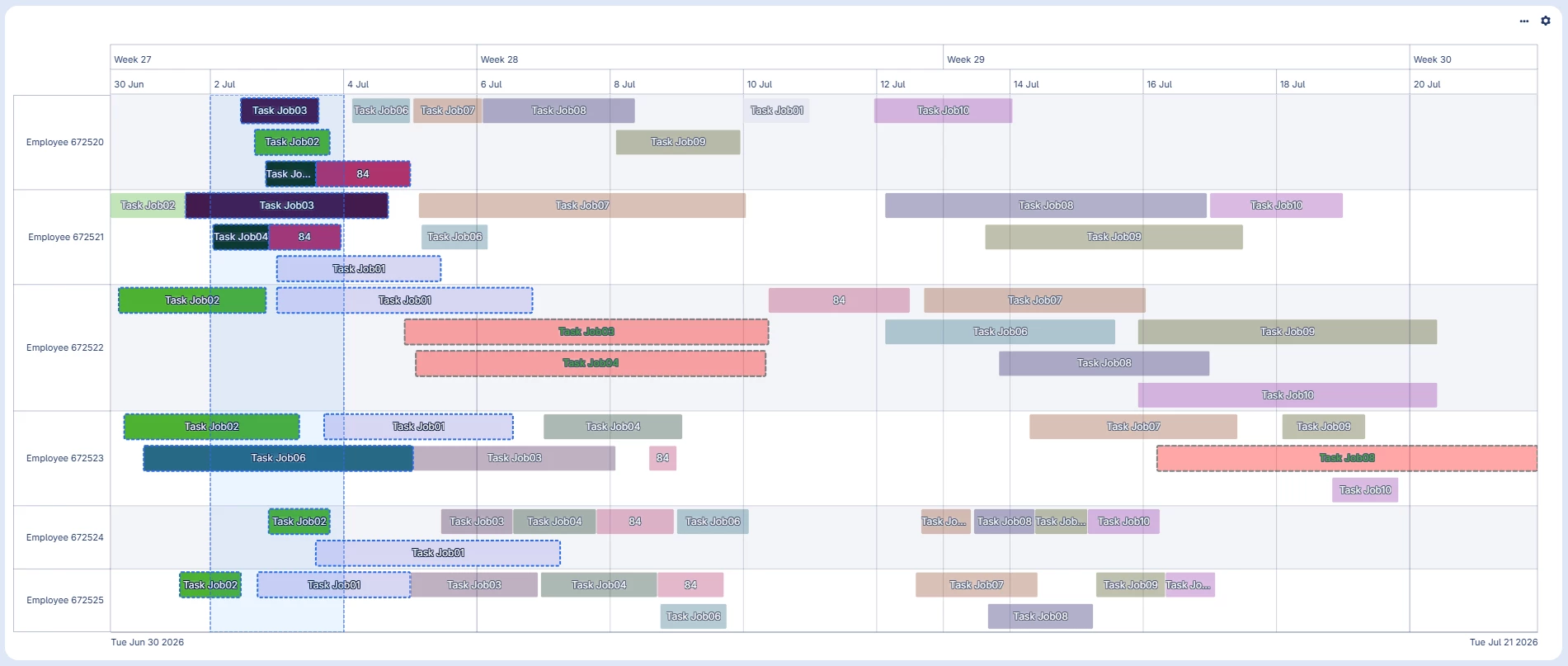
I'm happy to share that Gantt Chart v2 has been made available for close to a year on AIMMS WebUI. Gantt Chart V2 has now matured into a powerful widget for planning, scheduling, and resource management, with capabilities including:

🔹 Interactive task management

  • Move and resize tasks directly on the chart.
  • Move tasks between resources.
  • Configure the time resolution and snapping behavior.

🔹 Powerful task selection

  • Select multiple tasks using Ctrl+Click.
  • Select groups of tasks using click-and-drag block selection.
  • Use Ctrl+Drag to select multiple separate groups.
  • Move or resize multiple selected tasks while preserving their relative timing.

🔹 Flexible timeline & visualization

  • Adaptive and configurable X-axis.
  • Custom time intervals, labels, and formats.
  • Configurable gridlines.
  • Visualization of overlapping tasks.
  • Inline information within task bars.
  • Custom styling using annotations and CSS.

🔹Rich interactions

  • Customizable tooltips, including HTML content.
  • Double-click and right-click actions.
  • Support for custom zooming and horizontal navigation.
  • Configurable read-only behavior for tasks and properties.

🔹 Performance & scalability

  • Virtualized rendering to improve performance with large numbers of tasks and resources.
  • Efficient handling of sparse datasets.
  • Support for large Gantt charts with many resources and tasks.
  • Automatic vertical scrolling and dynamic task heights.

You can refer to the Gantt Chart V2 documentation to learn more about the widget and its details.


💬 Now we'd like to hear from you! This time, we're not asking "What should we build?" — we're asking:

"How well does Gantt Chart V2 work for you, and what should we improve next?"

If you're using Gantt Chart V2 in a real application, we'd especially love to hear:

  • What are you using it for?
  • Which capabilities do you find most useful?
  • How does it perform with the size of datasets you typically work with?
  • Where do you find yourself working around the widget?
  • Are there capabilities from other Gantt or scheduling tools that you would like to see in WebUI?
  • What would make Gantt Chart V2 significantly better for your use case?

Whether it's a missing capability, a usability improvement, a performance concern, or simply something that could work more intuitively, please share it with us!


Your feedback will help us shape the next evolution of Gantt Chart V2. 🚀


Thanks,

Madhu Krishnappa
AIMMS WebUI Product Owner


Didn't find what you were looking for? Try searching on our documentation pages:

AIMMS Developer & PRO | AIMMS How-To | AIMMS SC Navigator