


The AIMMS Versioning Policy applies to customers who develop AIMMS applications themselves or with the support of a partner and deploy those applications on the AIMMS Cloud Platform.
This policy does not apply to customers using SC Navigator, as AIMMS is responsible for ensuring that SC Navigator is developed and maintained using the latest supported version of AIMMS.
----
As part of our ongoing commitment to innovation, security, and performance, AIMMS is introducing a new version support policy for the AIMMS Cloud Platform. We want to give you ample time to plan and the right support to make the transition a success.
What Is Changing
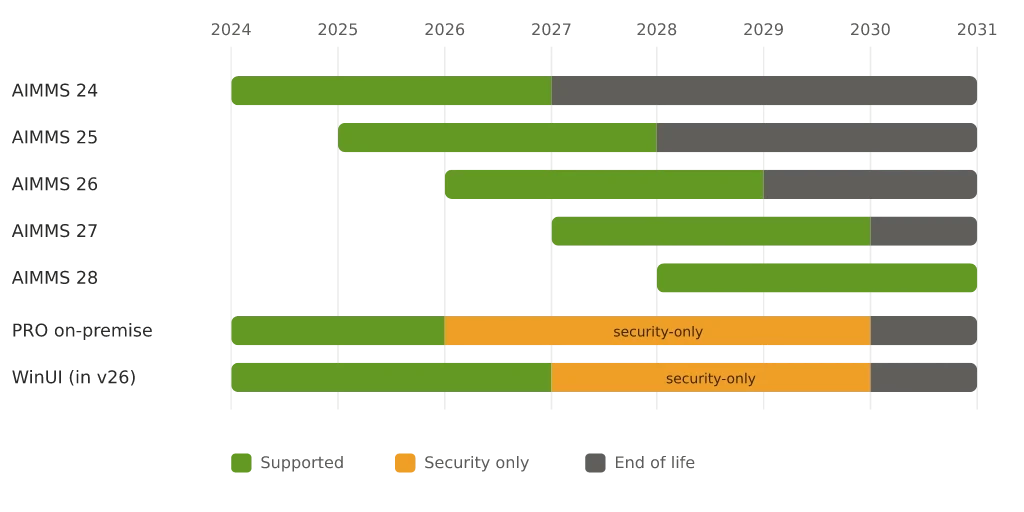
Going forward, AIMMS will maintain availability on the Cloud Platform for versions that are at most three years old. Concretely, this means that from January 1, 2028 onwards, only AIMMS* 26.1 and newer versions will be available on the Cloud.
We are introducing a structural policy that requires customers to upgrade AIMMS on a regular basis. Staying within a three-year window is the ongoing expectation, and we encourage you to build this into your standard IT planning cycle going forward.
Why We Are Doing This
This policy is essential for AIMMS to continue delivering a high pace of innovation. Maintaining a broad range of legacy versions puts a significant burden on our ability to develop new capabilities, including features driven by AI, and to ensure the performance, security, and maintainability of your applications.
By staying on a recent version, you also get the most out of AIMMS: better performance, the latest security standards, better support and access to new features as soon as they are available. Running an outdated version means missing out on improvements that can directly benefit your applications and your users.
We are also hearing from customers that their own IT and Security departments are increasingly requiring regular software upgrades as standard practice. Staying current with AIMMS aligns with this broader best practice, and our policy is designed to support you in meeting those internal requirements.
By standardizing on recent versions, we can focus our energy where it matters most: building the tools and capabilities that help you succeed.
What's in It for You
Upgrading is not only about staying supported. Recent versions bring a range of improvements you can put to work right away, especially for your most mission-critical applications:
-
A modern WebUI — new widgets such as Tabbed, Iframe, Diagram and Combination Chart, with a refreshed, fully themeable look.
-
Better tables and scheduling — Excel-grade table editing (block select, copy-paste, Excel upload/download, sorting and filtering), plus the new Gantt Chart for richer planning and scheduling views.
-
Python Bridge — work with Python directly alongside your AIMMS models.
-
New GMP functions — finer-grained control over generating, manipulating and solving your mathematical programs.
-
A faster model generator — roughly 2x faster LP/MIP model generation on average, with no changes to your model.
-
Newer solvers and solver features— the latest CPLEX, Gurobi, Knitro and more, for faster solves out of the box.
-
The latest security updates — years of CVE and dependency fixes that keep your most mission-critical applications current and compliant.
What You Need to Do in 2027
We encourage all customers running older AIMMS versions to use 2027 as the year to plan and execute your upgrade. Here is what we recommend:
-
Audit your current AIMMS version and assess how far it is from a supported version.
-
Review your application for any version-specific dependencies or customizations.
-
Plan your upgrade project, ideally with enough time to test thoroughly before the deadline.
-
Reach out to AIMMS if you have questions about what the upgrade entails.
What Has Changed Between Older Versions and AIMMS 26.xx
To help you understand the scope of an upgrade, this section outlines the most significant functional and technical differences between older AIMMS versions (such as AIMMS 4.80) and the current AIMMS 26.2 release.
The simplest way to find out exactly what applies to you: open a copy of your app in a current AIMMS version in a test or sandbox environment. The IDE surfaces deprecation warnings as you open and compile, and the Autolib reports which repository libraries it's updating and prompts you to save.
| ea | What changes | Does this apply to you? | Where it's handled |
|---|---|---|---|
| Look & feel | Classic Theme → WebUI Theming; Custom-Position / Group / Wizard layouts → Grid Layout + Workflow Panel | Check WebUI App Settings for a "Use Classic Theme" toggle that's on, custom CSS, or pages built with Custom-Position / Group / Wizard. If you're already on Grid Layout and the AIMMS theme, it doesn't apply. | |
| Data files | Single | Does your model load data from a single | |
| Connectivity | DataLink, the legacy Excel add-in and spreadsheet functions, older R / HTTP / Email clients, Tableau TDE → DEX | Open the Library Manager and look for these libraries, or search your model for | |
| Modeling constructs | Compound Sets, GeoFindCoordinates → modern equivalents | These flag themselves: opening the model in a current version produces a clear error (Compound Sets will stop compilation). | |
| Annotations | Old | The IDE shows a warning about old-style annotations still in use when you open the model. | |
| Algorithms | Matrix Manipulation functions, MultiSolve Library, Non-GMP AOA | These specific legacy functions are rarely used and are reimplemented with the widely-used GMP library. Search your model for these calls; if you don't recognize them, they almost certainly don't apply to you. | |
| Solvers | NETSOL, Octeract → mainstream lineup | Check whether your math program is set to use NETSOL ("pure network") or Octeract. If you use CPLEX / Gurobi / CONOPT / etc., it doesn't apply. | |
| External integrations | AIMMS COM, SDK, PRO Java/C++ API → PRO REST API | This is about systems outside AIMMS that call into it. If another application drives AIMMS via COM / SDK or the PRO Java/C++ API, your integration team will know; there's nothing in the model to check. |
Support Tooling: We Are Working on It
We understand that upgrading can be significant undertaking, and we want to make it as smooth as possible. AIMMS is developing tooling to support you through the upgrade process.
In the meantime, you are not on your own: our step-by-step Change AIMMS version guide walks you through the upgrade, and our User Support team is on standby if you run into questions.
We expect to share more details about what this tooling will look like before the end of 2026. As some of this tooling may leverage AI capabilities, we are still evaluating the exact form. We will keep you informed as plans take shape.
A Customer Success Story
We know that upgrade projects can feel daunting. One of our customers recently shared their experience after completing an upgrade, and their story is a great example of what is possible when you approach it with the right mindset.
"Although we were really dreading the project at first, the upgrade turned out to be a great opportunity. We took the time to look at our application more broadly and redesigned both the UI and the UX. The performance improvement was immediately noticeable after the upgrade, and thanks to the new interface, end-user adoption increased significantly. A key factor in that success was involving our user group early, both in the design phase and in testing."
Their experience highlights something we hear often: an upgrade is not just a technical necessity. It is an opportunity to modernize your application, improve the experience for your users, and set yourself up for future innovation.
Questions? Let's Talk
If you have questions about this policy, your specific situation, or how to get started, we are here to help. Reach out to your AIMMS contact, or get in touch via our support channels. We are committed to making this transition a success for you.