

- Community
- Product updates
Product Updates
Get the latest product news and previews of what's to come.
- 198 Product updates
Filter by product

Jan 24, 2020
Product Update - January 2020
Product Update - January 2020: New Drive Time Scenario, MPI update, AOA and WebUI changes This post is an archive of the Product Update email sent by AIMMS Product Owner, Gertjan de Lange. The new year brings new opportunities to improve our product for you. We are excited to share what's on our roadmap and will keep you informed in our Product Updates and Online Community. We also want to hear from you as much as possible! Help us improve AIMMS further, grow our community and reach the next level in decision support applications. Tell us how we can improve our product We'd like to invite you to share your product improvement ideas in our Community, as often as you can. Please provide as much detail as possible to help us understand your need. It helps us a lot to receive ideas in the form of user stories: “as a user I want to be able to do XYZ, such that I can achieve Y.” For example, instead of "Please add support for touchscreen," phrase your request as such: "As a production floor manager, my users need to be able to use my app on a touchscreen tablet so they can mark which machines are down while walking around." If you need help suggesting ideas as user stories, let me know. We will post some guidance in the Community as well. We look forward to hearing from you! Share your ideas Improved Drive Time Scenario in Center of Gravity Navigator We are pleased to announce that we have significantly improved the Drive Time Scenario in Center of Gravity Navigator, part of our Network Design Apps. With the improvements we are releasing, the model selects the minimum number of DCs that is necessary to reach all locations within the specified maximum drive time, and minimizes the total distance traveled. This results in fewer Centers of Gravity and greatly improved solution quality. The feature will be updated for our next release, so stay tuned! Internet Explorer 11 no longer supported As we announced in our Online Community, we have stopped supporting Internet Explorer 11, following Microsoft's announcement that it will end its support of Windows 7. We assume many of our Windows users are running on Windows 10 and/or use Edge or Chrome as their default browser. We recommend Chrome and will focus on both Chrome and Edge for further product developments. Share your application screens You may recall that we're building a new Page Layout manager, as mentioned in our previous Product Update. We could really use some customer application examples to understand how your Apps can be mapped onto the new layout. The more we get, the better we can serve you. Please share some screenshots of your Apps with us, they will help us greatly! Share your screenshots Math Program Inspector updates As of AIMMS 4.71, the Math Program Inspector (MPI) will be using GMP functionality. Until recently, it used an interface that was created before GMP functionality existed. This change has several benefits: The MPI code is easier for us to maintain, making it easier to add new functionality in the future. For example, we will work on an auto-scaling feature in the first half of 2020. The MPI can now be used to inspect stochastic programming models. That is, math programs generated with the function GMP::Instance::GenerateStochasticProgram. Several minor bugs have been fixed. The "new" MPI is slightly faster than the previous MPI. Do you have the latest AOA version? Please note that we have released a new version of the AIMMS Outer Approximation Algorithm based on GMP functionality. The old version is deprecated and will be removed in a future release. You can read more about both versions on this page. WebUI Improvements we're working on We will release a number of new WebUI items in the coming months. We are creating a new Page Layout and tooling for Widget editing. We have worked on an initial version that will contain the core functionality to apply a new Layout mechanism to Pages (and enable safe conversion from old to new pages). Furthermore, we are developing a series of stories of Map Widget extensions to improve usability for some of our customers. Think of tooltips, icon usage inside nodes, a heat map layer, the ability to open a right mouse menu, and more node size controls. We are also working on the following: The ability to hide the Navigation menu Perform inline Widget title edits (previously, a full replacement was needed) Position a subtotal on top or at the bottom of a table (or combined) Moving the Workflow Panel and Status Bar out of Experimental Features Please let me know if this update was useful in the comments below. Gertjan de Lange Product Owner
Related products:AIMMS LanguageWebUISC Navigator
- 0
- 87
- 0
- 6 years ago

Dec 11, 2019
Product Update - December 2019
This post is an archive of the Product Update email sent by AIMMS Product Owner, Gertjan de Lange. Product Update - December 2019: Burst Capacity, Demand Forecasting capability, Page Layout and Widget changes, Ending Windows 7 Support Happy Holidays!On behalf of our team, I wish you a wonderful holiday season and all the best in 2020. This year, we reached many product development milestones, including a series of new workflow features for developers using our WebUI, improved performance, Burst Capacity and secure VPN access on the AIMMS Cloud, many developments in the AIMMS Library repository, and much more. With the new year around the corner, we would love to hear how we can help you be more successful. Please take a moment to share your thoughts in our Customer Satisfaction Survey. The survey will take no more than 10 minutes to complete, and we are offering a free $25 Amazon.com gift card for the first 40 respondents who share their views. Take the survey AIMMS 4.70 is now available Earlier this month, we released AIMMS 4.70. This release includes the Status Bar feature, announced in earlier Product Updates, which was also offered as a pre-release through the AIMMS community. Unfortunately, the DateTimePicker and TimeZone features are not included in this release. We did not want to hold the release any longer, as several customers were waiting for some improvements. We hope you enjoy AIMMS 4.70! For more details, please read the release notes. New capabilities coming to SC Navigator We are adding a new Demand Forecasting capability to AIMMS SC Navigator which is due to launch in Q1 2020. We also made some improvements in the maximum drive time algorithm used in Center of Gravity Navigator. These improvements will be released early next year as well. Contact us if you are interested in learning more. Burst Capacity We have been working on offering Burst Capacity through the AIMMS Cloud. Some customers have been able to run thousands of scenarios with dozens of parallel sessions within days. Without the Cloud, this would normally take them weeks or months. With this capability, you can tap into significant server capacity over a short period of time (typically days or weeks), so that you can run a lot of scenarios without having to sign off for all of this capacity during the full subscription period. It's handy to run strategic yearly studies that require lots of processing power, for example. If you are an AIMMS PRO or AIMMS Cloud user and want to do the same, let us know and we can explore options that could work for you. Adjusting Page Layouts and Widget Management in AIMMS Apps We are currently working on a new way of handling the Page Layout in our Web Apps. We now have a ‘packery’ service on board that re-arranges the widgets on a page when the browser is re-sized, but we have learned that the behavior is not ideal. So, we started working on a redesign. Our idea is for pages to receive a ‘Layout’ property from a set of predefined – and in time – customizable Layout Templates based on Grid CSS. Besides improving the Layout, we want to make it easier to copy, paste, and duplicate widgets on pages or between pages, in order to improve maintenance and look and feel. The image above shows you an illustrative design of how this integration between Widgets and Page Layouts could take place. If you are interested in contributing to this discussion and providing feedback, please let me know. We are ending support for Windows 7 and Windows Server 2008 Microsoft announced it will no longer support both Windows 7 and Windows Server 2008 per January 14, 2020. Please take note that AIMMS will also no longer support or address any issues that happen to be reported on either OS. I hope this Update has been useful. Please share your feedback in the comments below. Gertjan de Lange Product Owner
Related products:AIMMS LanguageWebUIAIMMS PRO On-Premise & AIMMS Cloud
- 0
- 85
- 0
- 6 years ago
NewsNov 19, 2019
Product Update - November 2019
Product Update - November 2019: Important Deprecations, SC Navigator updates, Documentation Improvements and Survey This post is an archive of the Product Update email sent by AIMMS Product Owner, Gertjan de Lange. The year is almost coming to end. Let's cover some important news and feature releases you should be aware of as we head into 2020. By the way, if you have colleagues who would benefit from receiving upcoming Product Updates, ask them to sign up on this page! Important: Deprecations coming up As we announced in previous Product Updates and through product notifications, there are a number of deprecations coming up. Here's a reminder: As of this month, the Map Widget V1 and Page Actions V1 in WebUI will be removed from our releases. Please make sure all your Apps are converted to the new Map Widget (available since AIMMS 4.61) and built using the new Page Actions identifier setup (available since AIMMS 4.68). Please use AIMMS versions 4.68 or 4.69 to do so. Starting in January 2020, all AIMMS software releases will be 64-bit only. Per January, all AIMMS software releases will no longer support dongles. Contact us to request software nodelock licenses. AIMMS SC Navigator Since the introduction of AIMMS SC Navigator, we have been expanding the number of Apps as well as the functionality of the Apps themselves, based on our vision and customer feedback. Most recently, we enhanced AIMMS Network Design Navigator with the following features: Executive review: The new scenario comparison functionality allows you to drill into more detail (transport costs, cost/unit) and compare scenarios side by side to evaluate differences and impact. Demand simulation capability: Tackle demand uncertainty by simulating how changes in customer demand would impact your network’s capacity and costs. Assess how much additional demand your existing solution can accommodate and where it becomes infeasible. Detailed cost breakdown by location: This new functionality provides you with insight into how various cost components (fixed cost, variable cost, supply cost, transportation cost) are influencing the cost to meet the demand for a given product at a given location. Custom CSS via Annotation We have seen many developers making use of annotations to adjust the look and feel of widgets in the WebUI, so we created documentation to elaborate on the changes we currently support and added some examples. We hope this gives you more guidance. Click here for details (see “Widgets and CSS properties supported for Annotation”). Calendar and Time Zone Update In our September and October Product Updates, we mentioned that we were rolling out a DateTime picker in combination with Time Zone support. Unfortunately, we are facing some development challenges. Last week, we decided to halt the development of these features and re-group, as we were unhappy with the results. We are looking into possibly releasing the DateTime picker without the ability to set different application time zones, so Apps that do not run on multiple time zones can already benefit from it. If you are running Apps in multiple time zones, please let us know so we can perform tests with your use case. Help us improve our support resources by taking our survey! You know best what you need - please tell us in this brief survey! It should take about 5 minutes, and your input will help us greatly in deciding what to focus on as we improve and expand our product documentation, developer resources, and community content. Tell us what you need New Search in Documentation and How-To Speaking of improving support resources, we have added a search functionality in How-To and our Documentation. Check it out and don't miss the handy new Keyboard shortcuts list for developers. Cloud Uptime Stats Did you know we've had 100% uptime in our AIMMS Cloud Platform for the last 6 months in a row? I hope this Update has been useful. Please share your feedback in the comments below. Gertjan de Lange Product Owner
Related products:AIMMS LanguageWebUISC Navigator
- 0
- 65
- 0
- 6 years ago
Nov 5, 2019
Status bar pre-release available
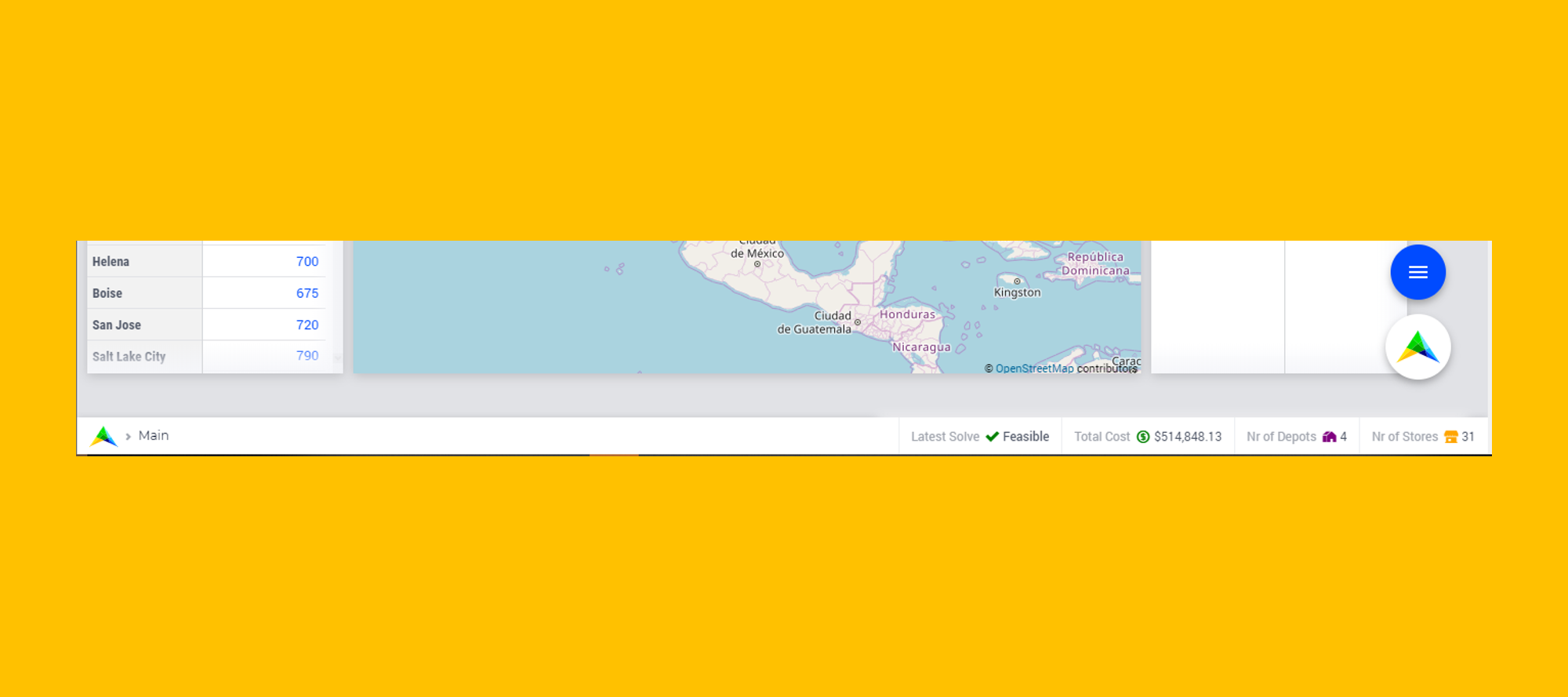
I like to inform you that I am making a pre-release available so you can try out the new upcoming Status Bar feature as e.g. discussed in https://community.aimms.com/aimms-webui-44/how-to-display-which-dataset-a-user-has-loaded-329 and in our previous Product Update https://community.aimms.com/product-updates-roadmap-customers-only-36/product-update-october-2019-413 The new Status Bar allows you to dynamically set the content in the sticky bar at the bottom (new UX only) that will be showing regardless of page switches. Ideal for items that need to be shown continuously. The items can also have a procedure call added to e.g. open a DialogPage to display details on the status item (see examples video in release folder). If you are running asynchronous solves, you can also update this items during a callback. Sure you find many other ways to use this.Of course, this feature and use cases will also be added to our AIMMS Design System (https://design-system.aimms.com/status-bar). The pre-release, the release conditions, and current documentation can be found here. Of course, you need to have an actively maintained license to try it out. Please add your feedback - do include screendumps as we love to see what you can build - as a reply to this post. Happy building!
Related products:WebUI
- 2
- 107
- 0
- 6 years ago
NewsOct 15, 2019
Product Update - October 2019
Product Update - October 2019: New Status Bar, AIMMS Design System, Python Update and more This post is an archive of the Product Update email sent by AIMMS Product Owner, Gertjan de Lange. Before delving into the Product Update, I wanted to highlight some upcoming events. October is here and that means it's time for the INFORMS Annual Meeting in Seattle. Many of us will be attending. I would love to meet if you're around. Send me an email and we can schedule a time or swing by Booth #3 to say hello. We are also organizing a Customer Event right after the INFORMS Annual Meeting. We will be touching on Customer Case Studies, our Supply Chain Vision and Product Roadmap, and Industry Trends. Sign up to attend! Status Bar We started developing the Status Bar this sprint and expect to round it up in November. We completed designs and functionality, adding the option to call a procedure right from the Status Bar (for example, to open a Dialog with more details). You can see its specification below. WebUI::StatusBarItems === {'header', 'icon', 'color', 'text', 'tooltip', 'procedure', 'state'} WebUI::StatusBarSpecification := {indexInteger, webui::indexStatusBarItems) To learn more about this feature, visit this discussion in our Online Community. Calendar and TimeZone Update We are close to completing the DateTime picker this sprint and will be releasing this soon as an Experimental Feature. Stay tuned! New Front-End Framework At AIMMS, we consider it important to update our architecture and tooling on a regular basis. This helps us build the best technology for our customers in the most effective way. Our Visual Studio update, see January 2019 update, is an example of the changes we're making. Last month, we brought the WebUI team together and after intensive research, testing, and several proofs of concept, we decided to move to React. We will transition away from our current jQuery-based code base by intelligently replacing existing components, while rethinking part of the underlying architecture and building new components. React will allow us to create even more complex and responsive elements without sacrificing maintenance. Moreover, the concepts behind React will be more suitable for adopting new engineering developments in the future. This is a major step in the lifecycle of our WebUI! AIMMS Design System I have highlighted the AIMMS Design System a few times in previous updates, to share what we would like to achieve with our UX changes. We realized that our customers really benefit from having access to this information, so after some feedback rounds, we made it publicly available. Read about our UX developments, our recently developed features and get tips and tricks to make your application work better. Visit the AIMMS Design System Python Integration We announced our plans to develop a Python integration in May and have been working hard to complete it. At this time, we are tuning the Developer side of the work (allowing AIMMS developers to easily use a Python script, including the ability to debug them). The next stage is deploying the AIMMS models that make use of Python onto our AIMMS PRO deployment platform (cloud and on-premise). Without the second, the value is limited to the Developer community. We want to ensure everybody using AIMMS can benefit from this. Let us know if you're interested, so we can provide you with pre-releases of the AIMMS-Python integration as soon as they become available. More updates to follow! I hope this Update has been useful. Please share your feedback in the comments below. Gertjan de Lange Product Owner
Related products:AIMMS LanguageWebUI
- 0
- 95
- 1
- 6 years ago
NewsOct 2, 2019
Product Update - August 2019
Product Update - August 2019: Workflow Panel available, Status bar, Data Manager and CSV Table Option This post is an archive of the Product Update email sent by AIMMS Product Owner, Gertjan de Lange. Let's take a look at some trending topics on the product side. Workflow Panel now available as experimental feature Our new Workflow Panel is now available as an experimental feature. We are very pleased to see it's already in use by several customers. One customer already connected the workflow concept with a user group. Slicing the workflow based on the ‘CurrentUser’ or ‘CurrentUserGroup,' shows different parts of the workflow to specific users opening the App. A pretty advanced use case! We are getting some feedback to improve this feature and would love to hear yours. Join the conversation Status bar We are currently designing a feature that will allow you to fill the status bar at the bottom of the WebUI App with custom information. Like earlier Workflow and Action definitions, the information can be steered from within the model. Since you might want to display information that can be triggered by various actions, including asynchronous solves or computes on the AIMMS PRO platform, this feature will be connected to the AIMMS engine and update automatically. Removing the Data Manager and CSV Table Option We noticed that several customers preferred to remove the Data Manager and CSV Table Option. When you are using CDM, the Data Manager becomes obsolete. Similarly, special CSV file creators have been developed in the model that are more sophisticated than the table download. Others may prefer to prevent users from downloading data altogether. As of the next feature release, likely AIMMS 4.69, you will be able to remove these options using the App and Table settings. This will make it easier to remove them without the need to add custom CSS code. We're still fine tuning some things and would love to hear your feedback in the Community. Join the conversation Collect Profiler Data In AIMMS 4.68, we added a new procedure, ProfilerCollectAllData. With this procedure, you can retrieve the current results of the profiler from a parameter in your model. For example, to display them in your UI. This is especially useful when you want to investigate the timings of a model that runs server-side, without the IDE. Data will be retrieved for procedures and functions and for parameters and sets that have a definition. Check out the AIMMS Function reference for details. I hope this Update has been useful. Please share your feedback in the comments below. Gertjan de Lange Product Owner
Related products:AIMMS LanguageWebUI
- 0
- 62
- 1
- 6 years ago
NewsOct 2, 2019
Product Update - September 2019
Product Update - September 2019: New Highlight Feature, AIMMS 4.69 Release and Performance Improvements This post is an archive of the Product Update email sent by AIMMS Product Owner, Gertjan de Lange. We have a lot to share in this Product Update, including some interesting features coming up in AIMMS 4.69. Read on to get the details! Highlight information in your App We introduced a new experimental feature in the bug fix release of AIMMS 4.68 that allows you to highlight specific items in your Gantt chart and Table Widget. For instance, you can use the Highlight feature to quickly see what belongs together when clicking on a cell in the table, or in a batch on the Gantt Chart. The example above shows all San Jose-related information in yellow. This additional option is a big improvement to our current widget annotation options, as those are less ideal for this task. Our thanks go out to the customer who shared crucial feedback to help us improve! Find out how to use this feature New features in AIMMS 4.69 We are currently preparing to release AIMMS 4.69 and AIMMS PRO 2.23. You will find many new and interesting features in these releases. Let me highlight a few: We have added the ability to add Widget Actions to the Scalar Widget, the Slider Widget and the Legend Widget (in fact, to all widgets that have title headers). As of 4.69, on-premise AIMMS PRO users will have the ability to enable the offline use of libraries made available through our online repository (e.g. R or HTTP). This way, your AIMMS PRO instance does not have to be connected to the Internet to activate libraries in the repository. The combined releases allow you to validate whether Directories or Files exist in the AIMMS PRO storage using two new functions: pro::storage::ExistsBucket & pro::storage::ExistsObject. We have enabled multi-objective support for Gurobi users Performance Improvements We added a large series of WebUI performance tests into our build pipeline and identified opportunities to improve our code base. Over the last two months, this resulted in a 25% improvement in page load times. This is great news and we are happy to say that many of our customers have noticed! Thanks to this, we can now better understand how changes to our code impact our performance, and we can make our improvements more robust. Coming soon: DateTime Picker We are working on integrating a DateTime picker. For it to work effectively, we will enable you to set an Application Time Zone, so that you can have applications run by multiple users in multiple time zones. Data will be converted to the respective client time zone automatically once it's set. We hope to release this feature in AIMMS 4.70. 100% Cloud Uptime in August I am thrilled to share that August was the fourth month in a row where we reported 100% uptime, including maintenance. Take a look at this article in our Community for more insights on the AIMMS Cloud. I hope this Update has been useful. Please share your feedback in the comments below. Gertjan de Lange Product Owner
Related products:WebUIAIMMS PRO On-Premise & AIMMS Cloud
- 0
- 84
- 1
- 6 years ago

Sep 17, 2019
The AIMMS 4.69.1 Release was released on September 17, 2019 (build 4.69.1.0).
Changes made in this release are listed below. AIMMS improvements Multi-objective optimization problems can now also be solved with Gurobi 8.0 and higher. The incumbent callback procedure has been renamed to candidate, and the new incumbent callback procedure has been renamed to incumbent. Note that the functionality of the incumbent callback procedure has changed as it now can no longer be used to reject candidate incumbent solutions (use the new candidate callback for that). The math program suffix .CallbackNewIncumbent has been renamed to .CallbackIncumbent. The procedure GMP::Instance::SetCallbackIncumbent has been renamed to GMP::Instance::SetCallbackCandidate, and the procedure GMP::Instance::SetCallbackNewIncumbent has been renamed to GMP::Instance::SetCallbackIncumbent. (The math program suffix .CallbackNewIncumbent and the procedure GMP::Instance::SetCallbackNewIncumbent are now hidden.) During the execution of certain statements, AIMMS now responds quicker on an attempt to interrupt the execution via the AIMMS interrupt tool. AIMMS is gradually replacing its compiler by a new version. In the old compiler, the precedence of the $-operator was not always consistent and in many cases different from what the language reference says. In the new compiler the precedence of the dollar operator is always as stated in the language reference, taking precedence over all other binary operators. This can cause a different interpretation of your expressionm, and therefor a warning is now reported when the new compiler encounters an expression in which this may be an issue: The precedence of the $ operator has in some situations changed in the new compiler. Use parentheses to make your intention clear. In some cases, the changed interpretation can lead to compile errors, which may be puzzling. In other situations, the result may be different. To correct these warnings there are multiple solutions: add the parentheses around the operands of the in-operator in an expression: P $ i IN setI -> P $ (i IN setI) replace the $-operator by a |-operator for a domain condition: sum( i $ i <> EP, P(i)) -> sum( i | i <> EP, P) remove the 1 $ for expressions that are already binary valued: 1 $ P(i) > 7 -> P(i) > 7 Please note that the 'onlyif' operator is also treated as a $-operator. During the creation of an .aimmspack file, you can now indicate that you want to include a copy of each repository library that is part of your project. The end user can then run the project without the need to have access to the on-line library repository. It is no longer allowed to assign a set with only one element to a non-scalar element valued parameter. For example: myElemPar(i) := { i }; This has never been part of the official AIMMS syntax and should now be rewritten as myElemPar(i) := i; The Intrinsic Database Functions TestDataSource, TestTable and TestColumn now set the CurrentErrorMessage with the available information if they return 0. WebUI Improvements Visible licenseinfo text above Menu and Settings (LicenseInfo, sessions.default.id, sessions.default.id.private, widget.visibility.greyout) on the Miscellaneous tab under Application Settings are now hidden so users can't (easily) use it. They are still present under the Advanced tab, though. When opening a WebUI model containing a Map V1 widget or Page Actions V1 functionality, you now get a deprecation warning. The dialog contains a link explaining why this is and what you can do to make your WebUI future-proof in this respect. App developers now have the control to hide/show the download CSV data button in a table widget with the option "Hide Download data" in the Table widget settings. When UI Editable is set to false, the end user now cannot change the values for showing/hiding the data manager in the Application settings and for showing/hiding the CSV download button in Table widgets. The settings cog-wheel for several smaller widgets (such as button, label, upload, download and selection box) has been changed, such that it no longer floats outside the widget but stays inside so users can actually find it easily and have no overlap or out of viewport issues. Widget actions are now also available for Scalar, Legend and Slider widgets. Resolved AIMMS Issues When calling AIMMS procedures from the WebUI, local parameters were not reset. CPLEX 12.9 could hang in a callback procedure. A chapter on SessionArgument has been added to the Function Reference. Referencing a defined parameter that has a domain condition from within an expression could sometimes lead to a strange and incorrect compilation error. The number of nodes shown in the progress window after a solve was not correct if CPLEX was used. Resolved WebUI Issues The Busy bar is back when any execution is triggered from a dialog window. When a _text parameter is added to the Gantt Chart for inline text in the jobs, on moving the job out of the Gantt Chart viewport, the text was also going outside of the viewport. Deleted widgets were not immediately removed from the WebUI.json file.
Related products:AIMMS Language
- 2
- 267
- 3
- 6 years ago

ReleaseJul 19, 2019
AIMMS 4.68.1 Release (was released on July 19, 2019)
The AIMMS 4.68.1 Release was released on July 19, 2019 (build 4.68.1.6). Changes made in this release are listed below. A high level overview can be found at the AIMMS New Features Page. Looking for best practices on how to use AIMMS? Check out the AIMMS Knowledge Center. AIMMS improvements The new procedure ProfilerCollectAllData allows you to retrieve the profiling measurements of statements that are executed on the server and thus display this data in the WebUI. Knitro 12.0 has been added. The AIMMSXLLibrary has a new option axll::TrimLeadingAndTrailingSpaces. If you set this option to 1, any leading or trailing spaces in a cell value will be removed before passing it to AIMMS. WebUI Improvements The WebUI now supports name changes in the AIMMS model. Before this version, using identifiers in the WebUI that had their name changed in the AIMMS model, required you to re-select the changed identifier(s) where used in the WebUI. From now on, model name changes are propagated to the WebUI. AIMMS has been extended with a procedure 'webui::SetProgressMessage' which allows you to replace the text of the 'busy' message in the WebUI with something more suitable to your specific situation. You can update/change this message multiple times during execution. For details, see the documentation. We added Page Actions to the WebUI, which help your users to get quick access to actions that are needed often, while at the same time reducing unnecessary clutter on their WebUI pages. For details, see the documentation. WebUI now offers, similar to the Page Open Procedure, a Page Leave procedure, which is called upon leaving the page for which it is specified. For details, see the documentation. We are currently working on our Workflow support feature in the WebUI. For more details and information on how to get access to this experimental feature, see the AIMMS New Features Page. When selecting a widget in the widget manager that is not in view on the current page, the page is now scrolled such that the widget will be in view, in order to be highlighted properly. Resolved AIMMS Issues There was a problem related to the resolution of identifier names that contain both a library prefix and a suffix. This, a.o., could lead to unexpected errors when using case comparison in WebUI of identifiers that were declared in a library. The postsolve step did not always work correctly for models with SOS constraints containing continuous variables. When runtime identifiers are added or deleted (by another thread) the Model Explorer now updates its tree accordingly. In functions with both an iterative and a regular signature (such as first and last), compile warnings were suppressed and compile errors were misleading. During the first compilation at startup of a project, annotation identifiers that resided in a library were not always resolved correctly. Resolved WebUI Issues When resetting the Minimum Resource Height in the Gantt Chart, the chart did not react immediately. On the IE 11 browser, when the Gantt Chart with the Minimum Resource Height specified opens, all resources were loaded within the viewport first and only then the vertical scroll appeared. If a Gantt Chart showed the resolution error message, and you adjusted the Minimum Resource Height in order to tackle that, you would still get the error, only now with a scrollbar added to the widget. When having a Table widget of which the data depends on another widget and selecting a value in that Table, this could lead to the Table data jumping to its first row again after making a change in the widget on which it depended, thus losing the highlight on the value that you previously selected. Sorting a Table widget did not work when the Table was displayed on a Dialog Page. Widget actions will now close when the focus is lost(i.e. the user clicked on an other widget). On a WebUI page that has a PageLeaveProcedure with a requestid, executing a WebUI::OpenPage procedure would throw a "WebUI cannot run nested dialogs" message. Text inside Gantt Chart bars on pages with multiple Gantt Charts are now shown properly. Not all buttons were visible when placed in a Group Widget. When running under PRO/Cloud, the value of the project option 'WebUI_maximum_number_of_entries_in_widget' was not correctly initialized.
Related products:AIMMS Language
- 3
- 276
- 2
- 7 years ago

Jul 16, 2019
Just out, Product Update July 2019!
Check your inbox for more details! (Or contact us to sign up...) The short of it is: Workflow Testing in Alpha Phase: Pre-release testing is in progress Join the discussion Announcing WebUI Deprecations: As of the end of September 2019, new releases won't support old versions of Page Actions and Maps Internships at AIMMS: We've got a few summer internships in the works, with projects in Python integration, HTTP Client Library, and more. Contact us for more information about internships at AIMMS! Get connected with our Product Owner: Share ideas with Gertjan Connect with Gertjan on LinkedIn
Related products:WebUI
- 0
- 33
- 0
- 7 years ago

Jun 5, 2019
The AIMMS 4.67.4 Release was released on June 5, 2019 (build 4.67.4.0)
Resolved AIMMS Issues Using an element of a Calendar in the function Val or FormatString could lead to a crash when the calendar was using a string parameter for its time format. The two-arguments version of the function Ord could lead to a crash when the ordering of the set that is specified as the second argument was still out-of-date.
Related products:AIMMS Language
- 2
- 234
- 0
- 7 years ago

Jun 4, 2019
AIMMS 4.67.3 released (June 4)
Resolved AIMMS Issues Sensitivity ranges were not calculated for LP problems if the barrier algorithm with multiple threads was used.
Related products:AIMMS Language
- 1
- 58
- 0
- 7 years ago

May 29, 2019
AIMMS 4.67.2 Release was released on May 29, 2019 (build 4.67.2.0)
AIMMS 4.67.2 Release The AIMMS 4.67.2 Release was released on May 29, 2019 (build 4.67.2.0). Changes made in this release are listed below. A high level overview can be found at the AIMMS New Features Page. Looking for best practices on how to use AIMMS? Check out the AIMMS Knowledge Center. Resolved AIMMS Issues A so-called GUI-expression in the WinUI could cause a serious bug when the compilation of that expression was triggering two or more warnings (for example warnings on non-initialized identifiers). AIMMS ended up in an endless loop that was just consuming more and more memory. The syntax highlighting could give some unexpected coloring in deeply nested language constructs. Having a domain condition which resulted in an empty domain, could sometimes lead to a severe internal error when used in the left hand side of an assignment statement. Resolved WebUI Issues It could happen that incorrect expressions used for the Display Domain option of a widget did not lead to an error message (and, as a result, to unexpected data being displayed in the widget).
Related products:AIMMS Language
- 0
- 88
- 0
- 7 years ago
May 29, 2019
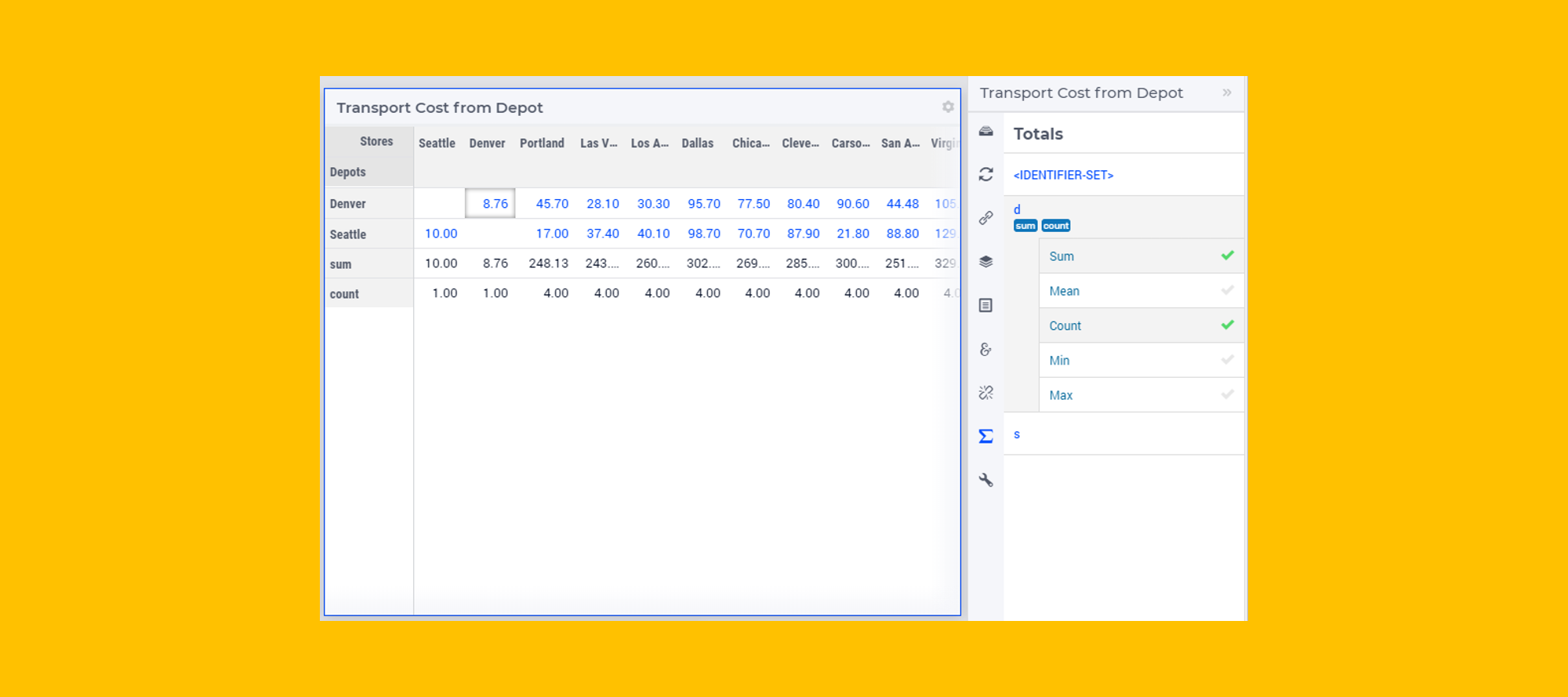
Tables Totals, what to do?
There has been quite some discussions on the Totals of a table in the AIMMS WebUI. At this moment, you can select out of 5 options (Sum, Mean, Count, Min and Max) and AIMMS will calculate the respective row/column totals. However, the totals are based on all values that exist in the identifier, so filters and/or display domain settings are not considered (so it's not a 'subtotal', a termed used in Excel). In many situations this is either unclear or unwanted, in some it is fine. We now wonder if we should: Add a set of new totals that are the actual totals of what is displayed based on filtering and display domain setting (hence the subtotal). Benefit, you can also show the comparison between the totals of values seen and all value. Adjust the current set of totals to be actually the subtotals of what is displayed. If we would do 2, the only thing that would change is the value we calculate. If we would do 1, we would need to find a proper header for both totals (e.g. 'sum' and 'sum (all)' for respectively the total sum of what is visible and the total sum of the dense identifier for that slice). In the example below, the subtotal sum for Portland column should be 62.70 and subtotal count 2. Any thoughts on PREFERENCE (replace existing or add new) and on NAMING the total operators in case we extend the set so it display nicely in the table? Please comment below.
Related products:WebUI
- 0
- 226
- 4
- 6 years ago

May 27, 2019
AIMMS 4.67.1 has just been released (May 27)
Main features are the single JSON structure and Gantt Chart improvements for the WebUI. AIMMS Improvements A new intrinsic procedure GarbageCollectStrings has been added to AIMMS. Calling this procedure may help in reducing the memory in use by AIMMS, when somehow the automatic garbage collect of unused strings does not seem to be triggered. See also the documentation in the Function Reference. The function CopyRange has been added to the AIMMSXLLibrary. WebUI Improvements We made a fundamental change in the storage of WebUI pages and widgets. For details, see the New Features page. Minimum and Maximum Resource Height have been introduced for the Gantt Chart. The Minimum Resource Height option adjusts the resource height such that when the height of all resources exceeds the height of the Gantt Chart widget, a vertical scroll bar appears on the right and the user can scroll down in order to see the resources below. When a batch is dragged down, the chart automatically scrolls to reveal the resources below. The Maximum Resource Height option will condense the resources to the set value such that the batches are not spread to fit the size of the Gantt Chart. As of this release, Gantt Chart jobs can now also be resized from the left side in case the duration of the job is editable (i.e. changing the start time while keeping the end time the same). A special cursor will appear if you hover on the sides of the job to signal that you can adjust its duration. There is a new option that allows developers to automatically open the WebUI upon project startup. It can be found in the AIMMS Options dialog in the category Project - Startup & Authorization, and is called Open_WebUI_on_startup. Resolved AIMMS Issues In a statement like MySet += myElementParameter, the set MySet could incorrectly be modified if myElementParameter contained inactive data. This could happen if myElementParameter had been assigned a certain element but that same element was later removed from the range set of myElementParameter. When using such an element parameter with inactive data in any expression, the element parameter should behave as if it is empty. When running a procedure from the WinUI that ended in a Halt statement, a strange empty error message dialog box popped up. CPLEX errors could be generated if the model contained indicator constraints and the CPLEX option 'Check solution' was switched on. AIMMS crashed if the ShadowPriceRange property was specified for a constraint in a multi-objective optimization model. (Note: sensitivity information is not available for multi-objective optimization models.) The (deprecated) Math Program suffices modelstat and solverstat were no longer updated. Resolved WebUI Issues If no value was set for the procedure column in the WidgetActions string parameter identifier, none of the widget actions were listed in the widget. Widget actions, bar chart settings, line chart settings and store focus options were not displayed in the Options editor when running a WebUI app on an iPad. After editing a cell in a Table involving a vertical scrollbar, the focus on the current element could be lost (i.e. on a row which scrolled out of focus as a result of the edit).
Related products:AIMMS Language
- 2
- 105
- 0
- 7 years ago

May 24, 2019
AIMMS 4.66.2 Release is the latest version and has been released last week
AIMMS 4.66.2 Release The AIMMS 4.66.2 Release was released on May 17, 2019 (build 4.66.2.6). Changes made in this release are listed below. A high level overview can be found at the AIMMS New Features Page. Resolved AIMMS Issues CPLEX errors could be generated if the model contained indicator constraints and the CPLEX option 'Check solution' was switched on. Sometimes an incorrect unit analysis warning was triggered, when the units involved unit parameters. Using the loopcount in the condition of a For statement could lead to a severe compilation error. The specification ">t8i" in the FormatString caused an error when the actual value to display was equal to 0. When a multi-dimensional identifier was written without parentheses where that was not expected, AIMMS would sometimes crash instead of raising a compilation error. In rare cases, when the WebUI was open, AIMMS would hang during compilation (showing the 'Scanning' status). High dimensional identifiers leaked memory when closing the model (but not AIMMS). Resolved WebUI Issues Sometimes identifiers which should display were hidden on a page. Zooming in the map widget using the mouse would sometimes also scroll the whole page. Earlier, if the node size for a set of nodes was the same, the map would consider the value in the set with node radius ranging from 3 to 10, i.e any value 3 and below would take node radius as 3, 10 and above as 10 and the rest the absolute value 4-9. We have now increased the max size to 21.25, so node size 3 and below will be radius 3, 4 to 21 that absolute value and 21 and above radius 21.25. Having a domain condition which only involved an element parameter, could lead to the associated identifier not being displayed in the WebUI. Using custom widget positions could lead to unexpected rendering of your WebUI when resizing the screen. In the Selection box widget, the order of the elements displayed in the selection list was not always as expected. When running a procedure (by pressing a button on the WebUI) and having the Data Manager still open, could lead to a message stating that 'another procedure is already running'.
Related products:AIMMS Language
- 0
- 85
- 0
- 7 years ago

May 24, 2019
A new version of AIMMS PRO has been released (AIMMS PRO 2.31.3 (2.31.3.3))
A new version of AIMMS PRO has been released (AIMMS PRO 2.31.3 (2.31.3.3)). AIMMS PRO 2.31.3 Release On May 21, 2019, we released AIMMS PRO 2.31.3 (2.31.3.3). Changes made in this release are listed below. Improvements DB Tunnel App: Provides easy and occasional access to the AIMMS Cloud App database running in VPN. Please see the documentation for more details. Resolved Issues On-Premise: Fixed an issue where installation or upgrade to AIMMS PRO 2.30 or higher could fail on some Windows Servers due to the incorrect version detection check by AIMMS PRO. Release notes for AIMMS PRO
Related products:AIMMS PRO On-Premise & AIMMS Cloud
- 0
- 74
- 0
- 7 years ago

May 6, 2019
AIMMS PRO 2.31.1 (2.31.1.4) has just been released
AIMMS PRO 2.31.1 (2.31.1.4) has just been released. For more details please visit https://aimms.com/english/developers/downloads/download-aimms-pro/pro-release-notes/ Starting with this version we provide secure VPN connection to the Application Databases for Cloud Customers. For details please visit https://manual.aimms.com/cloud/db-config.html
Related products:AIMMS PRO On-Premise & AIMMS Cloud
- 0
- 57
- 0
- 7 years ago

Apr 24, 2019
Workflow menu
In light of our Workflow improvement project, we had defined 4 new user stories that we have been developing and releasing over the last few months. At this moment, we are about to release the Widget Actions (4.66) after having released the Side Panels and Dialog Page concepts (see https://aimms.com/english/developers/downloads/product-information/new-features). Our next task ahead is a new UI concept to help end users to go through a particular workflow; we call this the Workflow Menu. Below you can find the most current (illustrative) design sketches we created to be able to discuss our ideas with stakeholders. I like to use this forum to collect some feedback from you. My current ask is what you prefer, assuming you have the choice between 2 ideas, what would you choose? Horizontal (left to right) or Vertical (top to bottom). Please use the poll below. BTW: you also see some visualization ideas on the state of a step in a workflow (state options are active, inactive, incomplete, complete, and error). Of course, any other feedback is welcome!
Related products:WebUI
- 1
- 365
- 8
- 7 years ago


Apr 24, 2019
Integration with Python
We have started with the integration of scripting language a while back (our 1st language was R, see https://manual.aimms.com/rlink). Currently, we are working on integrating Python. Our first step is to have it available for AIMMS App Developers such they can integrate Python scripts into their models with the purpose to improve your overall application. The idea is to do this is a (more) general way such that other scripting languages can follow. Also, we want to assure developers can debug the scripts during development and integrations before deploying them (step 2). Our second step is to enable you to deploy models on your AIMMS Cloud, or your AIMMS PRO on premise platform. This to assure we are empowering the end users of the Apps. We foresee a number of use cases, for example Use of specific Python functions not available in AIMMS s.a. ML algorithms to e.g. create better forecasts to feed the model Ability to fetch and process data from other sources that is needed for your model .. What use cases do you see for AIMMS with a Python integration? We love to hear from you.
Related products:Integrations and Data Exchange
- 3
- 366
- 4
- 7 years ago

Apr 11, 2019
AIMMS 4.65.1 release notes
AIMMS 4.65.1, including the Dialog Pages feature, has just been released. Also CPLEX 12.9 has been added. Please read complete release notes here
Related products:AIMMS Language
- 0
- 61
- 0
- 7 years ago

Mar 29, 2019
AIMMS PRO Hotfix Release 2.30.3 (2.30.3.0) - release notes
Today (29 March 2019) we released AIMMS PRO Hotfix Release 2.30.3 (2.30.3.0), which is mainly needed for On-premise Customers. For more details please visit, https://aimms.com/english/developers/downloads/download-aimms-pro/pro-release-notes/ Starting with this PRO version Audit logs can be available for on-premise customers. For new installation ‘AUDIT_LOG_LEVEL’ property will be there into AimmsPROServerlog.xml file with the default value ‘OFF”. For existing installation, you can do ‘Restore all to Defaults’ in log management then AimmsPROServerlog.xml file will be altered with this settings.
Related products:AIMMS PRO On-Premise & AIMMS Cloud
- 0
- 59
- 0
- 7 years ago

Sign up
Already have an account? Login
Please use your business or academic e-mail address to register
Login to the community
No account yet? Create an account
Enter your E-mail address. We'll send you an e-mail with instructions to reset your password.